
Plugins

Cart Stock Reservation Timer

Hold stock for each shopper while they check out, show a clear countdown, and stop overselling during sales and limited drops.

  • Version 1.0.0
  • WordPress 6.2+
  • WooCommerce 7.0+
  • PHP 7.4+
  • HPOS compatible

See it in action

WooCommerce does not hold stock when a shopper adds a product to the cart. During a sale or a limited drop, many shoppers can have the last unit in their cart at the same time. Some find it gone at payment, others pay and you have to refund.

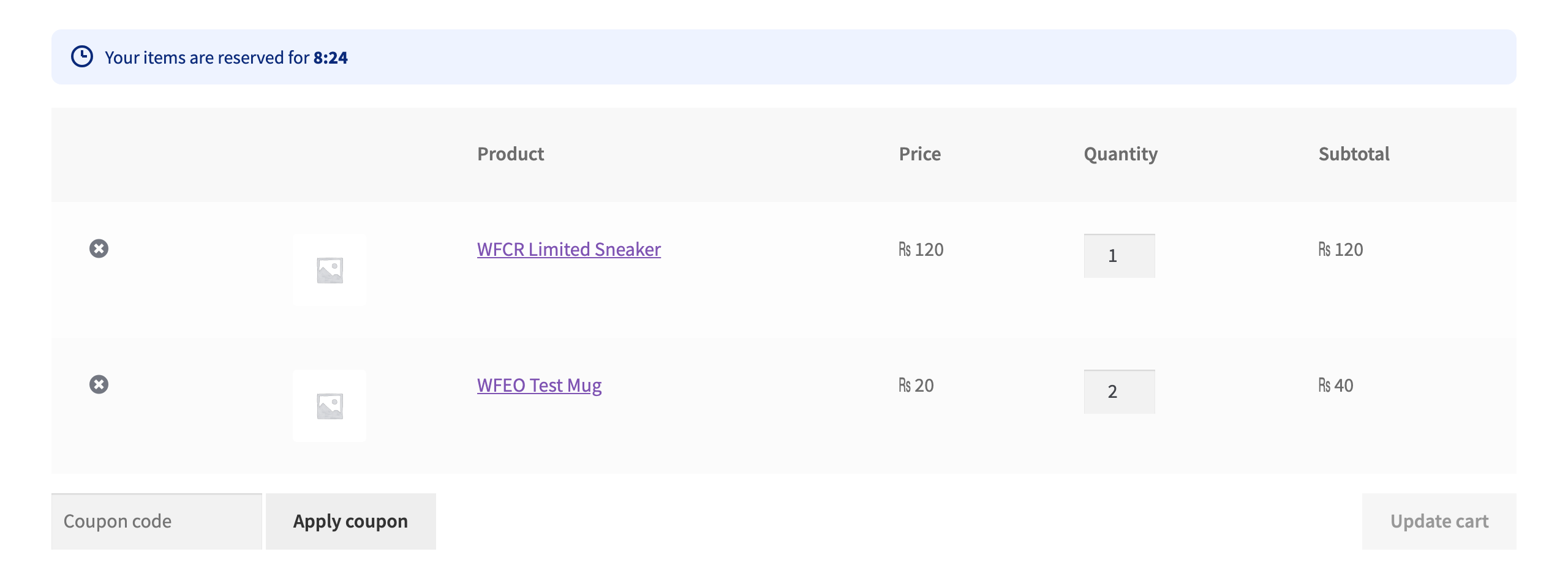
Cart Stock Reservation Timer for WooCommerce reserves the stock the moment it goes into the cart. Other shoppers only see what is really left. A countdown tells the shopper how long the items are theirs. When the time is up, the stock goes back on sale.

Most countdown plugins only show a clock. This one actually holds the stock.

Free and Pro

Free In the free plugin

What it does

  • Real stock hold at add to cart. The quantity is reserved for the shopper for the minutes you choose. Other shoppers see stock minus what is held.
  • Safe for simultaneous shoppers. Holds are written inside a database transaction that locks the product’s stock, so two shoppers grabbing the last unit at the same second cannot both get it.
  • Automatic release. When the time is up the held items are removed from the cart (or kept without the hold, your choice) and the stock is free again. A background job cleans up holds even when the shopper has left.
  • Countdown everywhere. Cart, checkout and mini cart. Works with the classic cart and checkout and with the Cart and Checkout blocks.
  • Hands off to WooCommerce at checkout. When the order is placed the hold ends and WooCommerce’s own “Hold stock” reservation takes over, so there is no gap and nothing is counted twice.
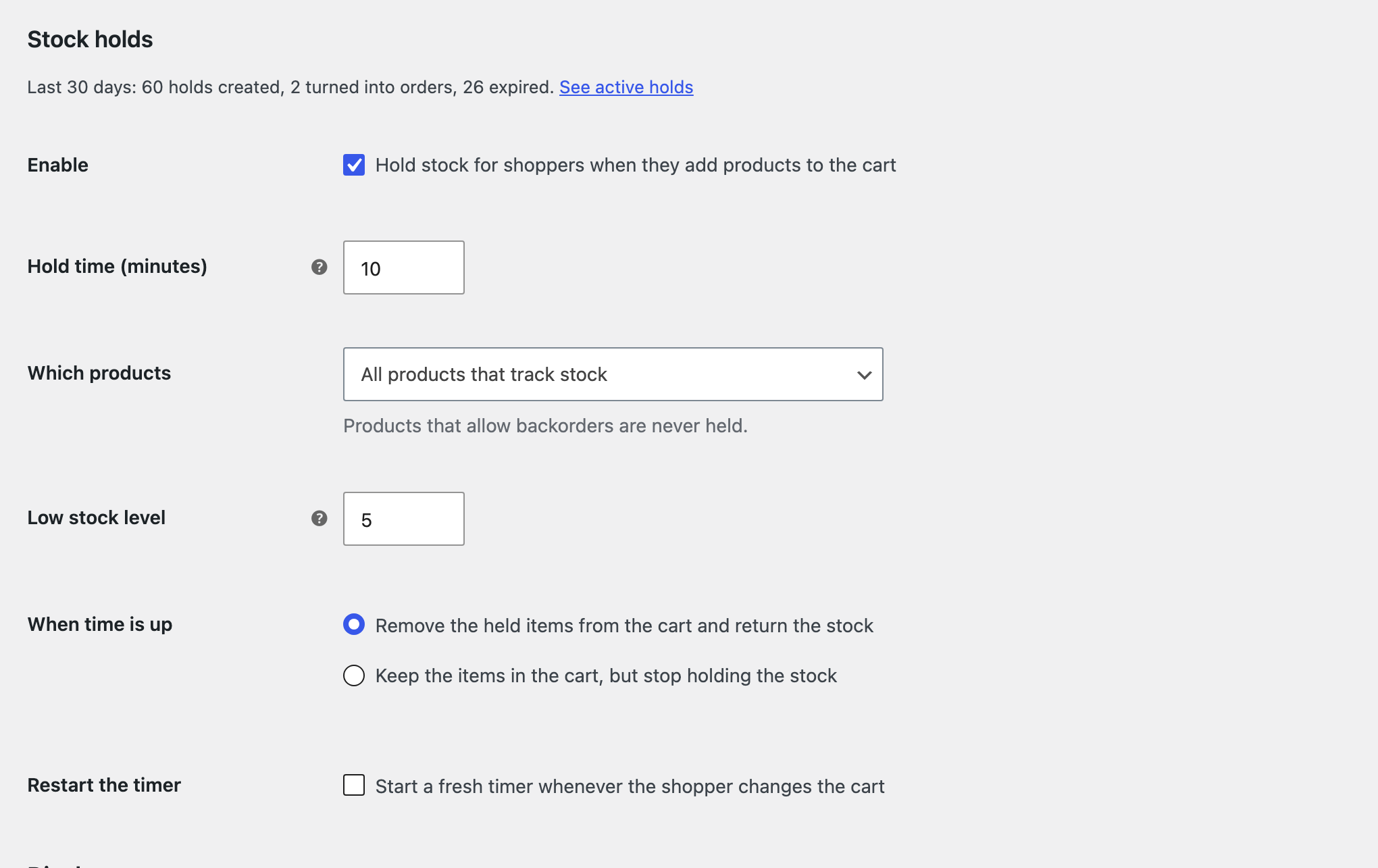
  • Choose what to protect. All products that track stock, only products with low stock, or only the products you tick. Variations are supported.
  • Honest stock message. Optionally show “2 in other carts right now” next to the stock count. When everything left is held, the product shows that it is reserved, not a fake “sold out”.
  • Your words and colours. Change the countdown text, its colours and the messages shown when time is up.
  • Restart or keep the timer. Choose whether changing the cart starts a fresh timer.
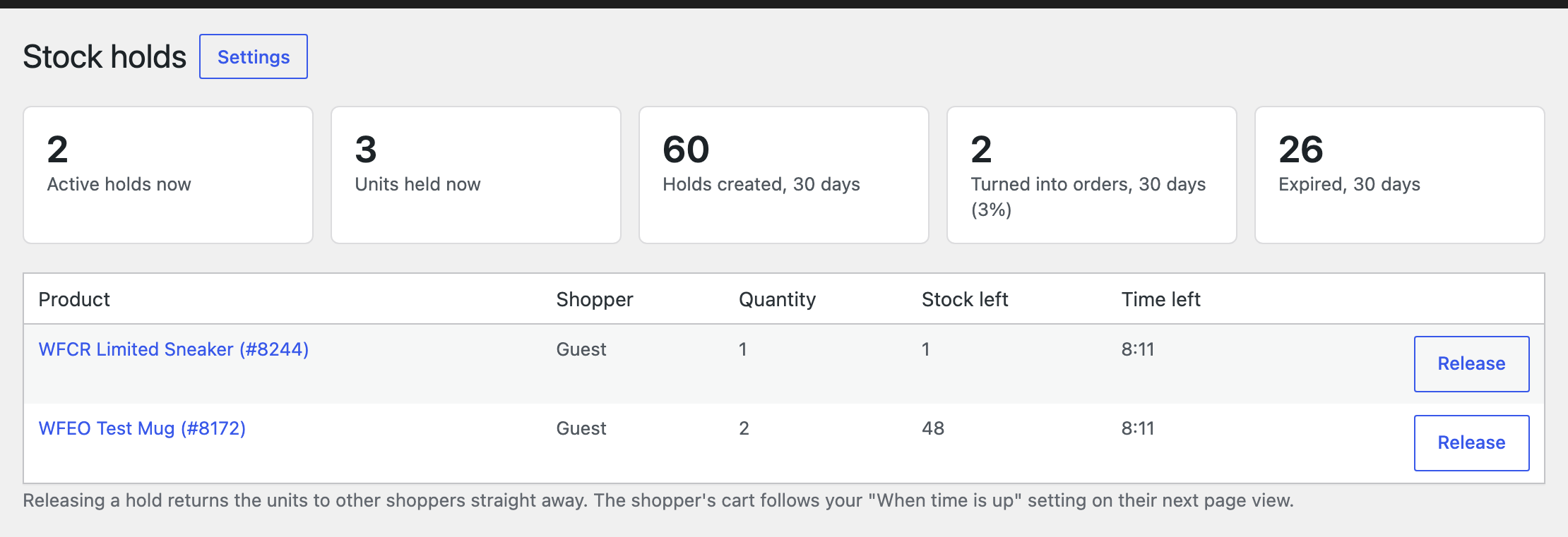
  • Active holds screen. See every hold with product, shopper, quantity and time left, and release one with a click.
  • 30 day counters. Holds created, turned into orders and expired, stored on your own site.

Built the WooCommerce way

  • Compatible with High Performance Order Storage (HPOS) and the Cart and Checkout blocks.
  • Holds live in their own small database table, never in product or order data. Your real stock value is never changed.
  • Logged in shoppers keep their holds when they log in during checkout.
  • No external calls, no tracking, no account needed.

Pro Everything in free, plus

Features

  • Timer rules. Different hold times per product, per category and per user role. When the cart holds several products, the shortest time wins.
  • Sale period. Hold stock only during a sale, or use a shorter timer during it.
  • Extend button. In the last minute the countdown offers extra minutes. You choose how many minutes and how many times.
  • Hold limits. The most units of a product one shopper can hold, optionally counted across everyone on the same network (stored only as a hash).
  • Waitlist. When all stock left is held in other carts, shoppers leave their email and hear the moment a unit comes back.
  • Queue mode for drops. Returned stock is held for the next person in line, who gets a claim link that puts it straight into their cart.
  • Reminder email a few minutes before a reservation ends.
  • Recovery email after a reservation ended without an order, with a one click restore link and an optional win back coupon.
  • Custom expiry actions. Send shoppers to a page when time is up, and offer the win back coupon in the message.
  • Timer designs. Progress bar, sticky bar at the top or bottom, floating badge, plus the [wfcr_timer] shortcode and the Reservation Timer block.
  • Reports. Holds, orders, conversion and the value of expired carts per day and per product, for 7, 30 or 90 days.
  • Developer tools. CSV export of the hold history and REST endpoints under wfcr/v1 for staff tools.

Pricing

Free

0

Core features, for any number of sites.

Download free

Pro, 1 site

$49per year

Use on 1 site. Updates and support for one year.

Buy Pro

Pro, Unlimited sites

$199per year

Use on unlimited sites. Updates and support for one year.

Buy Pro

Prices in USD. Pro renews yearly and can be cancelled from your account. Pro needs the free plugin installed.

Questions, answered

Does it change my stock numbers?

No. Your stored stock stays the same. Shoppers see the stock minus what is held in other carts, and the held units go back automatically when a hold ends.

Which products are held?

Products that track stock and do not allow backorders. You can limit holds to low stock products, or to products you tick in their Inventory tab.

What happens when the timer ends?

By default the held items are removed from the cart and the shopper sees a short message with a link back to the shop. You can choose to keep the items in the cart without holding the stock instead.

What happens at checkout?

When the order is placed, the hold ends and WooCommerce's own checkout reservation takes over for the time set in WooCommerce, Settings, Products, Inventory, "Hold stock". Nothing is counted twice.

Does it work with the Cart and Checkout blocks?

Yes. The countdown appears above the Cart and Checkout blocks and in the Mini Cart block, and items disappear without a page reload when time is up.

Can I stop holds for shop managers or wholesale customers?

Yes. Under Advanced, pick the user roles that should never get holds.

Does it work with page caching?

Yes. Cart, checkout and the cart fragments are not cached by WooCommerce compatible caching plugins, and the countdown reads its time from the cart.

Is my data sent anywhere?

No. The plugin makes no external requests. Holds and counters stay in your own database.

Changelog

1.0.0

  • First release.

Got a bug costing you sales?

Send it over. A developer looks at it and confirms the price before starting.

Request a fix